Get in Touch
Ecommerce Holiday Readiness: An Amplience Peak Season Checklist

Share this page:
Peak season planning usually produces a code freeze and an on-call rota, and neither touches the settings that decide how an Amplience storefront behaves on the day. Four are worth an hour this week. Which content API your front end calls, because one caps at 100 requests a second. How long media URLs cache, because static ones cache for a year. What a purge costs at peak, because it makes the next request slower. And whether your sale ends by itself, because the platform does not end it for you.
Introduction: The Freeze Is Not the Plan
Every peak-season plan contains a code freeze and a support rota, and both are sensible. Neither tells you anything about how the storefront behaves at four times normal traffic.
A freeze stops new risk arriving. It does nothing about risk already in the build, and peak is when latent configuration problems stop being latent. A setting quietly wrong for a year produces no symptom at ordinary volume and a loud one on the Friday morning.
The checks below are the ones AmpliFabrik runs before peak, in that order. All four come from configuration rather than load testing, which matters because load testing is the part that slips.
What actually breaks on a storefront at peak?
Rarely the platform, and rarely the thing the freeze was protecting.
Peak failures on a content-driven storefront fall into four groups, and only one is code. Throughput: something in the delivery path has a ceiling nobody checked, and traffic finds it. Caching: content or media is staler than the business expected, or fresher than the infrastructure can sustain. Timing: a change due at midnight lands at ten past, or a promotion that should have ended keeps running. And the human one: the freeze is so wide that the fix you need on the day requires a committee.
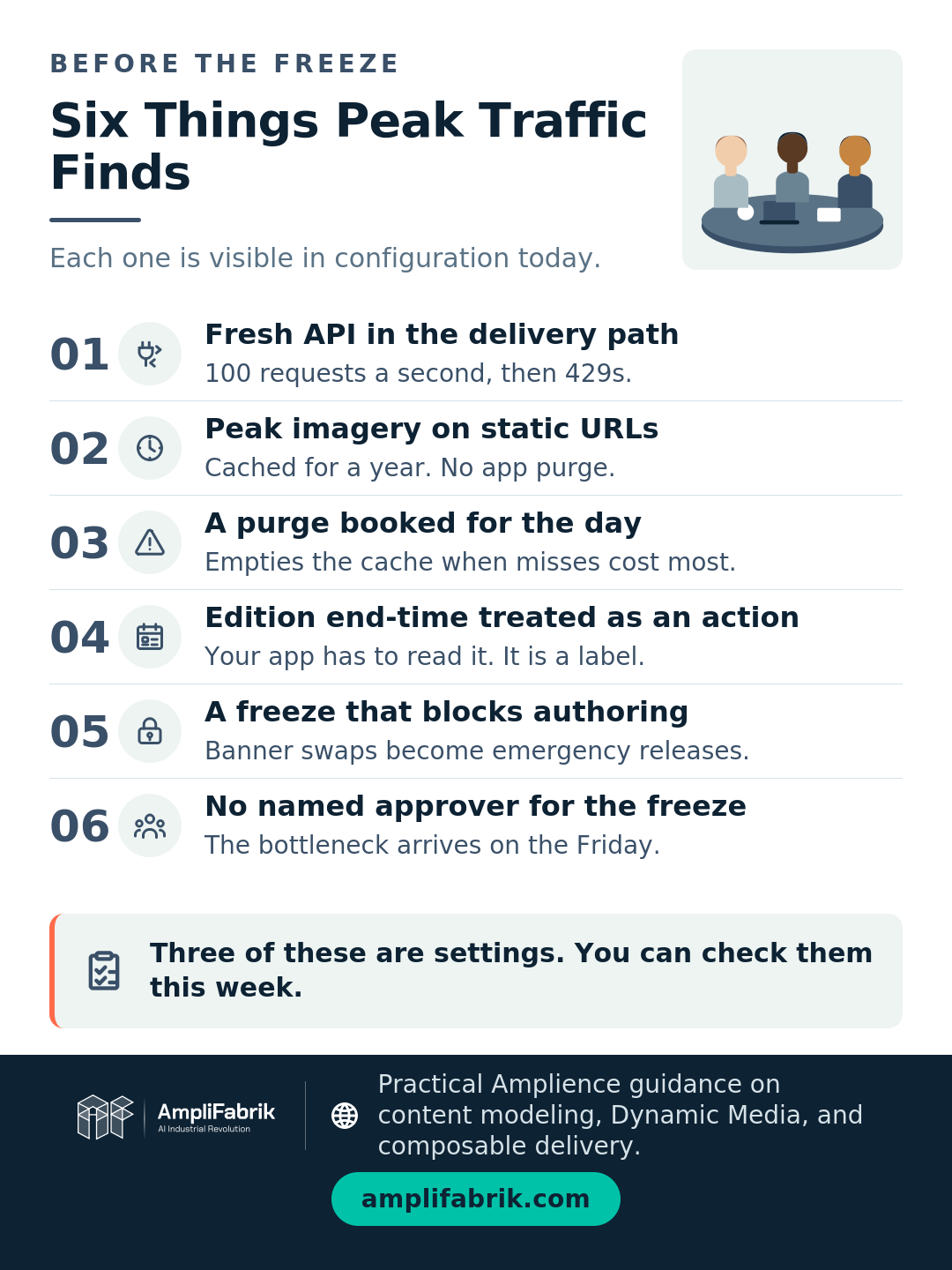
None of those four is found by a load test alone, and three of them are visible in configuration today. That is the argument for doing this now rather than booking a performance exercise for the week before.
Key Takeaway: Three of the four peak failure groups are configuration, not code. A freeze addresses neither.
Is your front end calling the cached API or the Fresh one?
This is the first check because it has a hard number attached, and because getting it wrong is invisible until the traffic arrives.
Amplience delivers content through two APIs. The cached Content Delivery API is the production one: it "provides cached data (~5 minutes), unlimited throughput, the lowest possible latency and 99.99% availability", with requests "automatically routed to the nearest POP and the nearest origin". The TTL is stated precisely elsewhere: "the Time To Live (TTL) for the Content Delivery Network (CDN) used by Content Delivery v2 is 5 minutes."
The Fresh API is a different tool. It is "designed specifically for the use of static site generators", offers "lower rate-limited throughput", and the ceiling is stated plainly: "The limits are: 100 requests per second, with a burst limit of 200 requests per second." Above that you get 429 responses. The documentation is equally direct about where it does not belong: "The Fresh API should not be used to deliver content to the end user in the browser."
The failure mode is specific. A front end calling Fresh for freshness, perhaps added during a launch when somebody wanted to skip the five-minute cache, works fine at ordinary volume and starts returning 429s above a hundred requests a second. Peak is where a site finds that number.
The check takes minutes. Find the content API hostname your production front end calls. If any production path uses Fresh, that is a remediation job for before the freeze, not after it.
Key Takeaway: Confirm the production front end calls the cached API. Fresh caps at 100 requests a second and is not for browsers.
What does your media cache do when you swap an image?
Something different depending on which URL form you used, and the difference is a year long.
Amplience caches media on two different schedules. For dynamic URLs, "the default TTL is set to 24 hours for the CDN servers" and "30 minutes for a browser". For the other form: "For assets consumed with a static URL the TTL is one year (365 days)."
That is the trap. A hero image on a static URL, swapped on the morning of the sale, does not change for anyone holding a cached copy, and it cannot be fixed from the usual place either: "static assets cannot be purged using Dynamic Media App".
Purging is not a free escape hatch, and the documentation is explicit about the costs. "Assets are purged one at a time and each request will use one of your purge credits", and "CDNs place limits on the number of purge requests to be made". A full account purge is worse: it "should only be required in exceptional circumstances", after which "the cache will be completely cleared of all assets, so the next asset request will be slower".
Read that against a traffic peak. An account purge on Black Friday morning empties the cache at the moment every request is a miss and every miss is slower, which is why the first question AmpliFabrik asks about peak imagery is which URL form it uses, not how good it looks.
| What you are checking | Dynamic media URL | Static asset URL |
|---|---|---|
| CDN cache life | 24 hours by default | One year |
| Browser cache life | 30 minutes | Inherits the long TTL |
| Purge from the Dynamic Media App | Yes | Not possible |
| Cost of a purge | One credit per asset, one at a time | Same, where a purge is available |
| Safe to swap on the day | Within the 24-hour window, with care | No. Plan it in advance |
So the readiness answer is to stage peak imagery early enough that no swap is needed inside the window, and to settle which URL form campaign assets use before anyone builds the creative. It is also where performance monitoring earns its cost: a cache behaving differently from the assumption shows up as response time long before it shows up as a complaint.
Key Takeaway: Find out which URL form your peak imagery uses. Static means a year, and no purge from the app.
Does your sale actually end when the edition ends?
Not on its own. This one surprises people every year.
Scheduling the start is reliable. "The edition start-time defines when the content and slots in that edition will be published", and because "when content is added to an edition, a snapshot of the content is taken", the version you approved ships "irrespective of any changes" made in between. Snapshots are immutable, so the documentation notes "we don't ever need to use content locking".
The end is different, and the documentation says so: "Content is never un-published, it's safer that way, but the edition end-time can be used by your application to make content inactive."
Read that carefully, because it moves the responsibility. The end-time is a value your front end can read. It is not an action the platform performs. If nobody wired the storefront to respect it, a Cyber Monday banner with an end-time of Tuesday 00:00 is still being served on Tuesday morning.
The check is a conversation rather than a configuration: ask whoever owns the front end whether it reads edition end-times, and what it renders when one has passed. If the answer is uncertain, schedule a replacement edition for the moment the sale ends rather than relying on the end-time. A scheduled publish is an action; an end-time is a label.
Key Takeaway: The end-time is read by your application, not enforced by the platform. Schedule the replacement.
What should a code freeze cover, and what must stay open?
A freeze that stops content is usually the wrong freeze.
The point of a freeze is to stop unreviewed change to the things that are hard to reverse: schemas, content types, delivery configuration, front-end releases, integrations. Those earn a freeze because a mistake in them is slow to diagnose and slow to undo under load.
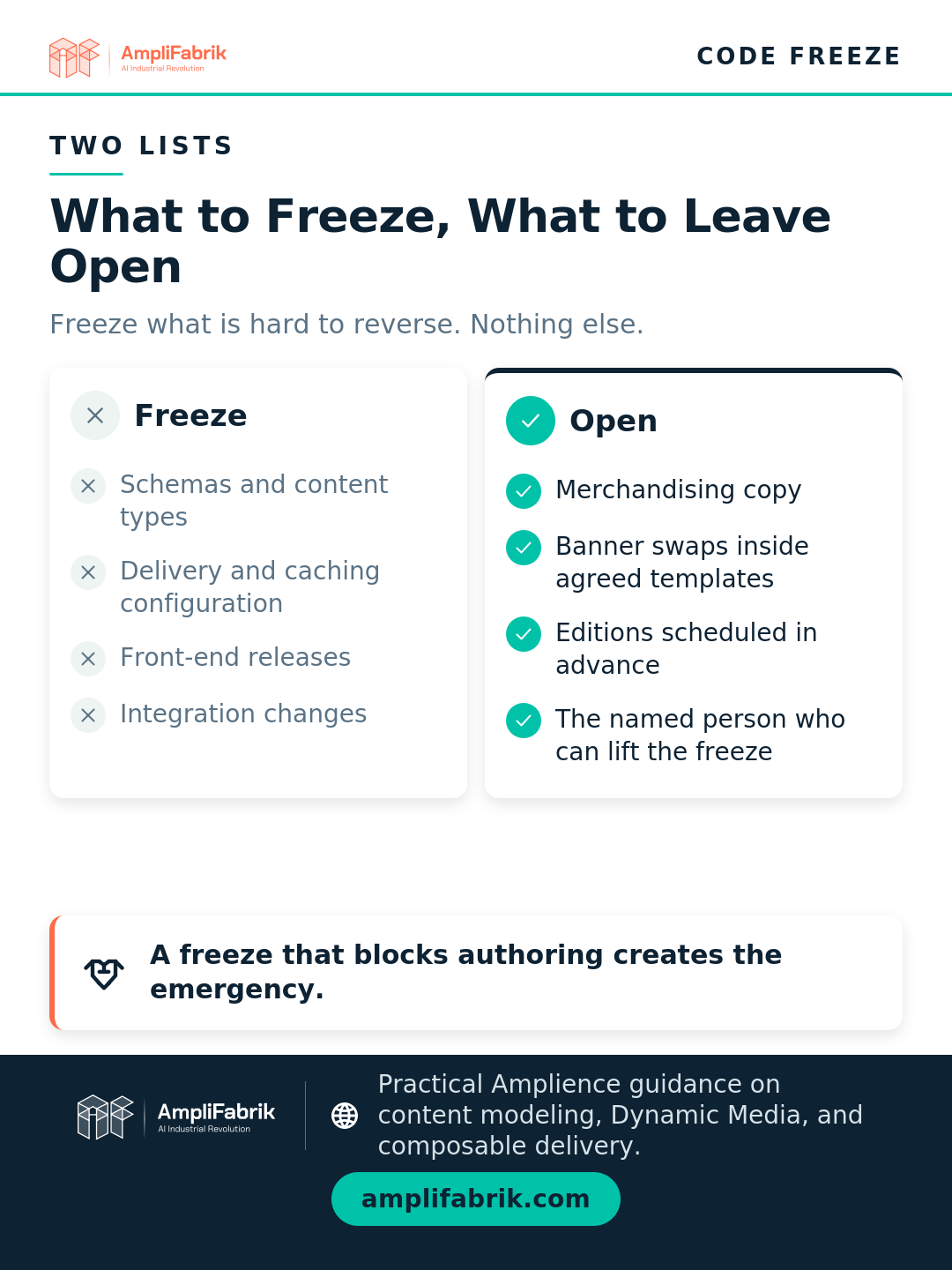
Content authoring is a different category. Merchandising copy, banner swaps inside an agreed template, scheduled editions prepared in advance: these are reversible, they are the operations a trading team needs during peak, and freezing them pushes the work into exactly the channel the freeze was meant to protect. A blanket freeze turns a thirty-second banner change into an emergency release, which is the worse outcome.
Two practical additions. Write down who can lift the freeze, by name, before it starts; an unnamed approver becomes the bottleneck on the day it matters. And agree what a genuine emergency looks like in advance, because that is harder to negotiate at 6am on the Friday. Whatever you allow through still needs its QA path defined.
Key Takeaway: Freeze what is hard to reverse. Leave authoring open, and name the person who can lift it.
How AmpliFabrik approaches peak season readiness
We run this as a fixed-scope read in October, not as a multi-week exercise, because the useful version finishes early enough to act on.
The read covers the four checks in order: which content API each production path calls, the TTL and URL form of the peak imagery, whether the front end reads edition end-times, and what the freeze covers. Every answer comes from configuration or one conversation, so it runs in days and ends in a list with an owner against each item rather than a report.
Sequence matters more than usual. Anything touching delivery configuration goes in before the freeze; anything that can wait goes after peak, with a date. Retail teams running several trading events a year get more from a standing retainer than from an annual scramble.
Two things we will not do. We will not recommend a full cache purge as a peak-day remedy, for the reason in the documentation: it makes the next request slower, and peak is when that is most expensive. And we will not sign off a freeze that blocks content authoring, because that converts routine trading work into emergency change in the week you can least absorb it.
Conclusion: Check the Two API Names This Week
Of the four checks, one takes minutes and carries a hard number. Find the content API hostname your production storefront calls and confirm it is the cached Content Delivery API rather than the Fresh one. Fresh caps at 100 requests a second, returns 429s above it, and the documentation says it should not serve browsers at all.
Then find out whether your peak imagery sits on dynamic or static URLs. One caches for a day, one for a year, and the second cannot be purged from the Dynamic Media App.
Those two answers remove the failure modes hardest to fix on the day. The end-time question and the freeze scope can follow next week; both are conversations rather than configuration.
If you want the four checks run against your own environment before the freeze, AmpliFabrik does it as a fixed-scope health check that ends in a list with owners and dates. Send the production API hostnames and a sample of the peak campaign assets, and the throughput and TTL answers come back first.
Frequently Asked Questions
How do you get an ecommerce site ready for peak season?
Start with configuration rather than load testing, because configuration is answerable now and load testing tends to slip. On an Amplience storefront the four checks are: which content API the production front end calls, whether peak imagery sits on dynamic or static URLs, whether the front end acts on edition end-times, and what the code freeze actually covers. Each is answerable from settings or one conversation.
What is a code freeze, and how long should it last?
A code freeze is an agreed period when changes to the build are blocked so peak trading runs on a known state. It should cover what is hard to reverse under load: schemas, content types, delivery configuration, front-end releases and integrations. It should not cover content authoring, which is reversible and is the work a trading team needs during peak.
Should you purge the CDN cache before Black Friday?
Not as a routine step, and not during peak. Amplience purges assets one at a time against purge credits, and purging increases the response time the next time the asset is requested. A full account purge is documented as being for exceptional circumstances and clears every asset, so the next request for each one is slower. Stage peak imagery early instead.
Can you schedule Amplience content to go live at midnight on Black Friday?
Yes. An edition's start-time defines when its content and slots publish, and a snapshot taken when content is added to the edition means the approved version ships regardless of later edits. Allow for cache propagation: the content CDN TTL is five minutes. Ending a promotion is the harder half, because the edition end-time is a value your application reads rather than an action the platform performs.
What is the difference between the cached and Fresh content APIs?
The cached Content Delivery API is the production one: roughly five-minute cached data, unlimited throughput, CDN routing to the nearest point of presence. The Fresh API is built for static site generators, caps at 100 requests per second with a burst of 200, returns 429s above that, and the documentation states it should not deliver content to the end user in the browser.
Sources
- Amplience, Caching, Amplience Documentation.
- Amplience, Fresh API, Amplience Documentation.
- Amplience, Caching and purging, Amplience Documentation.
- Amplience, Publishing and scheduling, Amplience Documentation.
- Amplience, Content Delivery API overview, Amplience Documentation.